
The ƎPUB Redactor
A free bulk EPUB metadata editor for Windows and Linux, built for prepping ebooks for Kobo and other e-readers.
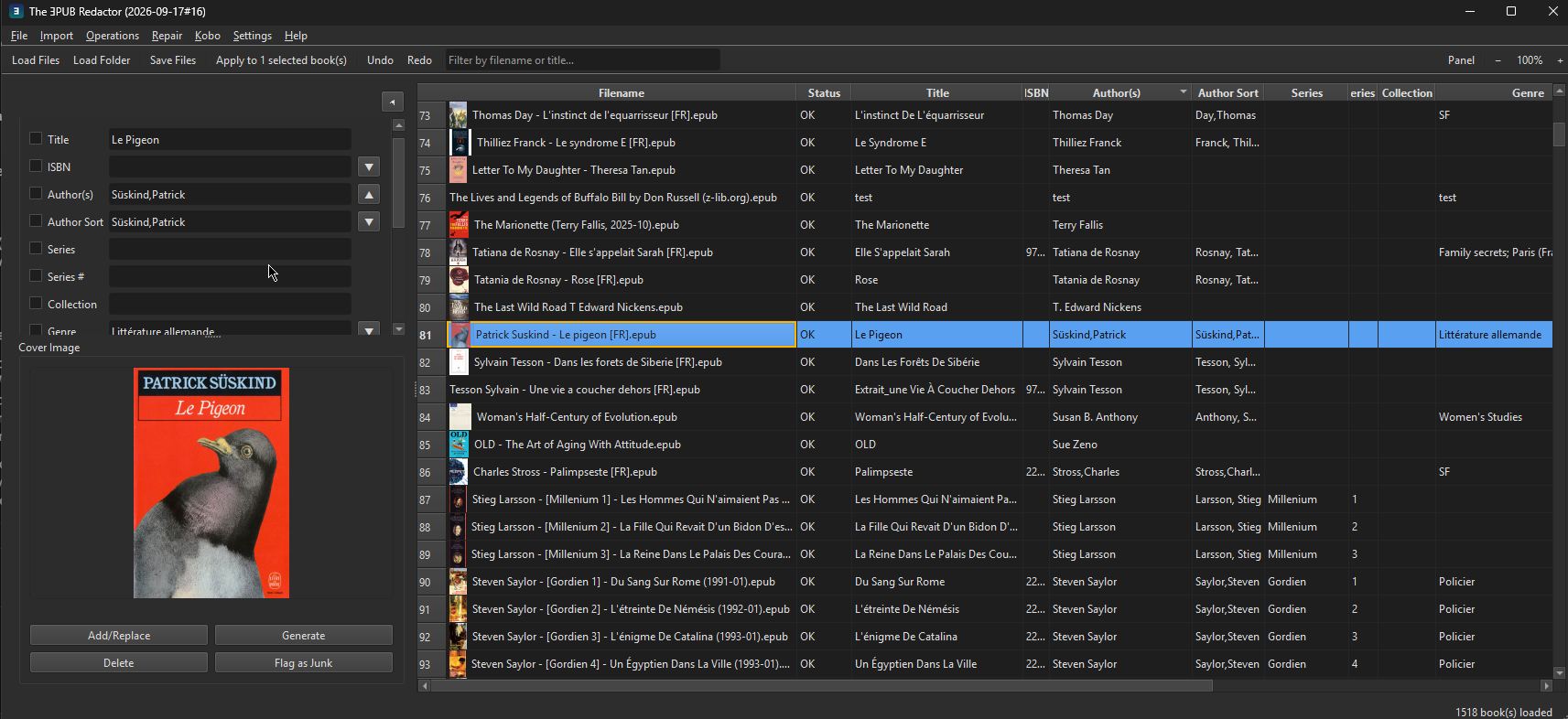
What it does
The UX is modeled on mp3tag: load a folder of EPUB books into a table, select several at once, and apply the same field changes to all of them in one go — no opening files one at a time.
Features
- Bulk-edit panel that mirrors whichever table columns are visible, in whatever order you've dragged them to — no separate field-management screen.
- Import Metadata from Google Books and Open Library — searches by title/author and brings back title, authors, publisher, year, ISBN, genre, language, description, and cover art in one review-and-apply step.
- Import to EPUB — converts MOBI, AZW/AZW3, DOCX, RTF, TXT, FB2, and more to EPUB via your Calibre installation, then adds the results straight into the working list.
- Generate Cover from Metadata — creates a placeholder cover (title, author, series) entirely offline, for books missing one.
- Cover quality: a Cover column shows each cover's size — yellow for low-resolution, red when missing — and Find Better Covers looks up Open Library's cover by ISBN, offering only larger ones, side by side before anything changes.
- Change Case (UPPERCASE / lowercase / Title Case / Sentence case) and Number Series (sequential Series # across a batch, fractional steps supported), both with a live preview before applying.
- Rename / Export / Move and Parse Filename → Metadata, pattern-based and previewed before committing. An optional ASCII-safe filenames option turns accented letters and typographic punctuation into plain ASCII (é→e, æ→ae, ß→ss). Renames can be taken back with File > Undo Last Rename, even after a restart.
- Clean Up Authors (Repair > Clean Up Authors…): reviews every loaded book’s Author(s) and Author Sort and fixes the usual messes — stray spaces and punctuation, “J.R.R.Tolkien” to “J. R. R. Tolkien”, role suffixes and junk (“(Editor)”, “Translated by”, “et al.”, life dates), “A; B” and “First Last & First Last” split into separate authors, ALL CAPS names, duplicate authors, and a missing or sloppy Author Sort generated or tidied. When Author(s) holds names written “Last, First”, that text is tidied and moved into Author Sort, and the display names are generated from it. Corporate authors (“Simon & Schuster”), “Anonymous” and non-Latin names are left alone. The review lists each book before and after; the sure fixes are ticked, guesses are listed unticked, and nothing is written until Save All (one Undo reverts it). Initials are spaced everywhere an author is written, and in file and folder names built from
%authors%or%author_sort%(“J. R. R. Tolkien - The Hobbit.epub”). - Find Duplicates (Repair > Find Duplicates…): review-only. Each group says why it matched — identical content (only the metadata differs), same title and author (maybe another edition), or same ISBN with a different title (the ISBN may be wrong). Nothing is selected or changed unless you choose an action; Not duplicates hides a group for good; moving files to the Recycle Bin refuses books with unsaved changes.
- Preferences (Tools > Preferences…, Ctrl+,): the everyday settings in one dialog with four pages — Filenames, Language (the blank-language default), Display and Tools and Paths (Calibre folder, Sigil program, Open Library database and dump files). OK / Cancel / Apply, and Reset to Defaults for the page you are on. It is the same dialog the other three Redactors have; Export / Import Settings is unaffected.
- Read Book (File > Read Book…, also in the right-click menu for one selected book): a read-only reader with the cover and the chapter list on the left. Images are shown (read one at a time from the EPUB, nothing is unpacked), the default look is a readable serif, and the book’s own CSS is ignored. A-/A+ and Ctrl++ / Ctrl+- / Ctrl+0 zoom, Ctrl+F finds in the chapter (Enter or F3 for the next hit), Alt+Left / Alt+Right switch chapter. The reader never writes to the book.
- Remove Running Headers and Page Numbers (Repair menu, an optional Redact step, and
epubredactor headers): cleans the page furniture a scan-and-OCR conversion leaves in the text and rejoins sentences cut by a page break. It acts only when the book shows clear evidence, and shows each book’s counts and examples first. - Include Subfolders (File > Include Subfolders, on by default, shared by all four apps) decides whether Open Folder, a dropped folder and Refresh List look in subfolders. After Open Folder the app also says when the folders hold e-books Calibre can convert (MOBI, AZW/AZW3, KFX, FB2, LIT and more) and offers to open Import to EPUB with them listed; a folder can be set to stop asking.
- History (Tools > History…, opt-in, off by default): once you turn it on under Tools > Preferences > History, every tag change written to a book is recorded with the old and new value, so a Save or Redact can be undone even after the app was closed (Restore Old Values). It follows a book when it is renamed or moved, never keeps covers, and Delete History sends the file to the Recycle Bin. The on/off setting travels with Export / Import Settings.
- Progress for everything slow: Redact runs each book on a worker thread, so the window stays responsive and Cancel works during a big save, a Calibre call or a lookup; Polish Book and Import to EPUB run Calibre in the background and Cancel stops it; big undo, right-click and row-height jobs show a progress dialog too. Shortcuts follow the family: Save All is Ctrl+Shift+A and Delete Files is Shift+Delete.
- Drag-to-reorder, hideable columns; a resizable cover-image panel; Genre and Language quick-pick lists — all persisted across restarts.
Scripting: info, set, rename, move, convert, validate and redact also run from the command line: see the command line guide below.
Redact, and everything since
Everything below is in the current release. Redact is the one-click path; the individual tools above remain available.
Redact steps: fix validation issues, deduplicate manifest ids, rebuild the manifest, repair navigation, generate a table of contents (a real one from headings is applied; a generic “Section N” one goes to review), strip HTML from the description, detect a blank language, read ISBN, publisher, year and series from the front matter, clean up authors (only the sure fixes are applied; guesses are named in the report), fill empty fields from lookups — a local ISFDB database first (it also fills an empty series and series number), then the local Open Library database, then Google Books and Open Library online — cover (by ISBN for a missing or junk-flagged one, else a generated cover when there is none), fill empty fields from the folder path, and remove running headers and page numbers. Optional, off by default: rename by pattern, move into folders, remove orphan files and the page-header step (twenty or more headers apply automatically, fewer go to Needs review). Each changed book is written to a temp file, checked (it reopens, nothing lost, no new errors) and only then swapped in.
- Redact: one click on the toolbar (or Edit > Redact, Ctrl+Shift+E) runs an editable recipe of steps on the selected files, or on all loaded files after asking. Each changed file is saved in place and its original goes to the Recycle Bin, so the Recycle Bin is the undo. Guesses are applied only at or above a confidence threshold (90% by default); weaker ones are listed under Needs review and never written. Files with unsaved edits or that failed to load are skipped and named in the report. A saved recipe keeps the patterns it was saved with (the editor shows a pattern trail of where each pattern comes from), so changing the Rename / Export pattern later does not silently change what Redact does.
- Move into folders: Rename / Export / Move has a third mode that files each item into a folder tree under a library root, using a pattern with
/in it. The preview shows each new path, nothing is overwritten (a taken name gets “(2)”), and File > Undo Last Rename puts everything back and offers to remove the folders the move created. - Metadata from the folder path: Parse Filename also reads folders. A pattern containing
/is matched against the file name and the folders above it, counted from your library root, with a confidence shown per file. Redact has a matching step that fills only empty fields. - Export / Import Settings (File menu): your recipe, pattern history, column layout and defaults in one JSON file for a new install or a second computer. Import shows every change before applying anything. Passwords, API keys and tokens are never included; tool paths and folders are offered unticked as “this computer only”.
- Command palette (Ctrl+K): type part of any menu command to find and run it. The menus follow one layout in all four apps: File, Edit, View, Metadata, Repair, Send, Tools, Help. Open in Default App is in the right-click menu, and Ctrl+Shift+A saves every changed file (Save All).
- Generate Table of Contents (Repair menu): books with no table of contents at all, typical of badly converted scanned-PDF EPUBs, get one built from their h1–h3 headings (or page titles) in reading order. You tick which books to touch and preview the entries first. An NCX is written for every book, plus an EPUB3 nav document for EPUB3 books; chapter files are never modified.
- Scan Content for Metadata in five languages: front matter and the last pages (colophon) are read in English, Norwegian, German, French and Italian, suggesting publisher, year, edition, the book’s language, and series and volume, each with a confidence. Translator, editor and illustrator are shown for information only, since the app has no field to store them. Nothing is applied without review.
- Validation stamp: Validate / Fix Issues records when a book was checked and the result in the EPUB’s OPF (
redactor:validation), written when you Save, so it follows the file when you copy it. The Status column shows the time, and “(changed since)” if the book’s files changed afterwards. DRM-protected and unreadable books are never stamped. - DRM-aware and safer: a cover that is DRM-encrypted is kept (Replace Cover, Generate Cover and Compress Images skip it); manifests that use percent-encoded file names (
ch%201.xhtml, accented names) are read correctly, so files are no longer wrongly reported missing or removed; saving replaces the original atomically and leaves no temp file after a failure; and one unreadable book cannot abort loading a batch. - Send to Kobo finds the reader on Linux (
/media/$USER,/run/media/$USER) and macOS (/Volumes) as well as on Windows drives. - Progress box fix: a “Scanning…” (or similar) progress box could stay on screen for good after its work had finished, when the work took about a third of a second or more. It now closes together with its work.
Where the metadata comes from
The ƎPUB Redactor works on its own: editing, validation, covers generated from metadata and Table of Contents generation need no outside source, and it stores no keys or accounts. Lookups are optional and every one is a review-then-Apply step. Online sources are only asked when you run a lookup. The local database is built from files you download; the app never bundles or downloads them. In Redact, the “Fill empty fields from lookups (local database first)” step asks the local Open Library database first when one is set up, then Google Books and Open Library online for whatever is still empty; it never changes a field that already has a value, and weaker matches go to Needs review. It asks a local ISFDB database before that, which also fills an empty series and series number. The hub has all four apps side by side, and every local database with the file it needs.
Online sources
| Source | What it provides | What you need | Notes |
|---|---|---|---|
| Google Books | Title, authors, publisher, year, ISBN, genre, language, description and a cover, by title / author or ISBN. | Nothing: no key or account. | Metadata > Look Up > Google Books. |
| Open Library (web API) | Title, authors, publisher, year, ISBN, genre (subjects) and cover. Language is not imported. | Nothing: no key or account. | Metadata > Look Up > Open Library. |
| Open Library covers | A cover image fetched by ISBN or by Open Library cover id. Find Better Covers offers it only when it is larger than the current cover; Redact’s cover step can use it too. | Nothing. Open Library limits cover lookups by ISBN per computer, and the app stops with a message when it refuses. | Nothing is fetched except by those actions. |
| Calibre, through your own install | Title, authors with sort names, series, publisher, date, tags, ISBN and description, as found by whichever metadata sources you have enabled in Calibre. | Calibre installed on your computer. The app runs Calibre’s own fetch-ebook-metadata command; it does not load Calibre’s plugins itself or bundle Calibre. |
Metadata > Look Up > Calibre. Which sites are asked is decided by your Calibre settings, not by this app. |
Local (offline) sources
| Source | What it provides | What you need | Notes |
|---|---|---|---|
| Open Library data dumps | Title, authors, publisher, publication date, ISBN and language, by ISBN or by title and author, with no network and no rate limits. No genre or description. A local match also records Open Library’s cover id, and Find Better Covers and Redact’s cover step fetch that cover directly by id. | You download the dumps yourself from openlibrary.org/developers/dumps: the editions dump, plus the authors dump for author names (or the single all-types dump), and optionally the works dump to give authors to editions that list none. Tools > Open Library Database builds the database; Cancel is safe, and an existing database is never left half-built. Metadata > Look Up > Open Library (Local Database) then searches it by ISBN, else by title and author. | Only editions with a valid ISBN are kept, in the languages you tick (English, Norwegian, Italian, German and French by default, or all). Roughly 2.5 GB for 8 million editions in the default languages (an estimate from measured samples). The optional works dump adds roughly 10–15 minutes and about 1 GB of temporary disk (an estimate). |
| ISFDB backup | The book’s series and series number (numbers like 2.5 are kept), with authors, publisher, date and language, by ISBN or by title and author. Translated titles inherit the original’s series. Science fiction, fantasy and horror only. No genre, no description, no cover. A match on the book’s own ISBN is trusted; a title and author match goes to Needs review, and the ISBN is only filled when it is safe (an ebook edition, or a print edition from the very year the book already says). | You download the ISFDB’s MySQL backup yourself from isfdb.org (backup-MySQL-55-YYYY-MM-DD.zip, about 340 MB; it needs no unpacking). Tools > ISFDB Database builds the database; Cancel is safe. Metadata > Look Up > ISFDB (Local Database) then searches it by ISBN, else by title and author. |
Measured on the 2025-12-27 backup: the build took under two minutes and gave a 154 MB database with 425,000 books (211,000 in a series) and 638,000 editions with an ISBN. The ISFDB’s web API has no series or title lookup, which is why the app reads the backup. Redact asks it before Open Library. |
From the file itself
- The book’s own text: Scan Content for Metadata reads the first and last few pages (title and copyright page, colophon) for ISBN, publisher, author, year, DDC classification, series and volume, and guesses the book’s language (English, Norwegian, Italian, German or French). It is a best-guess tool; review the matches before applying.
- The filename and the folder path: Parse Filename reads fields from a pattern such as
%authors%/%series%/%title%, and Redact has a matching step that fills only empty fields.
ISFDB data is licensed under Creative Commons Attribution; the app credits the ISFDB under Help > Credits, and the backup is downloaded by you, never by the app.
Licences and required acknowledgements for these sources are collected under Data and licences on the hub.
Command line
The ƎPUB Redactor can be driven from a terminal, a batch file or Task Scheduler. It is the same program: there is no second download. epubredactor.exe with a command name as its first argument runs that command and never opens a window; with no arguments, or with a file or folder, it opens the window as before. The commands use the same code as the window, so they give the same results, and not every window function has a command: these are the ones meant for scripting.
| Command | What it does |
|---|---|
info | Show each book's validation status, whether it has a cover, and its metadata. |
set | Set or clear metadata (-s Series=Dune -s series_index=2); several authors or genres are separated by ;. The saved file is read back, so a value the EPUB cannot hold is reported instead of claimed. |
rename | Rename from the metadata with a pattern such as %series% %series_index% - %title%. |
move | Move or copy into a folder tree under your library root, %authors%/%series%/%title%. |
convert | Turn MOBI, AZW3, DOCX, FB2 and the other formats Calibre reads into EPUB (needs Calibre); the original goes to the Recycle Bin only after the new EPUB opens. |
validate | List the structural problems of each book; --fix repairs the fixable ones and saves. |
redact | Run the same Redact recipe as the window: repair, clean up, tags from the path and file name, lookups, cover, rename, move. |
epubredactor info "D:\Books\Dune" --all
epubredactor set "D:\Books\Dune" -s series=Dune -s series_index=1 -n
epubredactor validate "D:\Books" --fix --json -o validate.json
epubredactor convert "D:\Incoming" --trash-original
epubredactor rename "D:\Books\Dune" -p "%series% %series_index% - %title%" --zero-pad 2
epubredactor redact "D:\Incoming" --disable metadata_lookup --trash-dir "D:\Trash"
Every command takes books, folders (searched recursively; -R for the top level only) or wildcards. Every command that changes books has -n / --dry-run to preview the result first. --json prints one JSON document instead of text, -o FILE writes the result to a file, and -q silences progress. The exit code says how it went: 0 done, 1 some books failed, 2 bad arguments, 70 an internal error, 130 interrupted.
- Nothing is overwritten: a taken name gets
(2),(3), and a file the pattern gives no name for is skipped, not called “untitled”. A mistyped%token%is refused instead of silently rendering as nothing. - Nothing is deleted for good: an original replaced by Redact or a conversion goes to the Recycle Bin, or to the folder you give with
--trash-dir, for a machine that has none. - No undo: unlike the window, the command line is not recorded in the app's rename log. Preview with
--dry-run. - Your settings apply: the saved Redact recipe, library root, offline databases, and the zero-pad and ASCII choices from the Rename window are what the commands use, unless a flag says otherwise (
--recipe FILE,--root,--zero-pad,--ascii).
A DRM-protected book is left untouched by Redact; set and validate --fix will edit one, but print a warning first, since you named the change.
Using it from scripts (Windows)
The Windows program is a windowed one, so an interactive shell does not wait for it. For automation ask for the result in a file, wait for the process, and read the exit code:
epubredactor.exe validate "D:\Books" --json --output "%TEMP%\validate.json"
if errorlevel 1 echo something failed

start /wait epubredactor.exe redact "D:\Incoming" --quiet

# PowerShell
$p = Start-Process epubredactor.exe -ArgumentList 'redact','D:\Incoming','--json','-o','C:\Temp\redact.json' -Wait -PassThru
$p.ExitCode
In a batch file write %% for each % of a pattern (-p "%%series%% %%title%%"), as cmd expands a single %name% itself. On Linux the program behaves like any command-line tool. The full reference, with every option and JSON field, is in the repository README.
Requirements
Two downloads on each release: a standalone .exe for Windows, and epubredactor-linux-x86_64.tar.gz for 64-bit Linux (Ubuntu 22.04+, Debian 12+, Fedora 36+, Mint 21+ and the like — unpack and run; settings live in ~/.config/epubredactor/). No separate Python install needed on either. Google Books / Open Library import and cover generation work standalone; format conversion via Import to EPUB requires a local Calibre installation (on Linux, found on PATH). Full details and the changelog are in the GitHub repository.
The rest of the family
The ƎPUB Redactor shares its UI and core editing patterns with three sibling tools, via redactor_common:
 The ƆBZ Redactor
 The ɯP3 Redactor
 The Ʌideo Redactor
 Dossier
 Pluteus
 All the Redactor Tools
 Kinderkopje